

How Long Does It Take to Charge a Vape (And Why It Feels Like Forever)
How Long Does a Vape Take to Charge? A Quick Answer

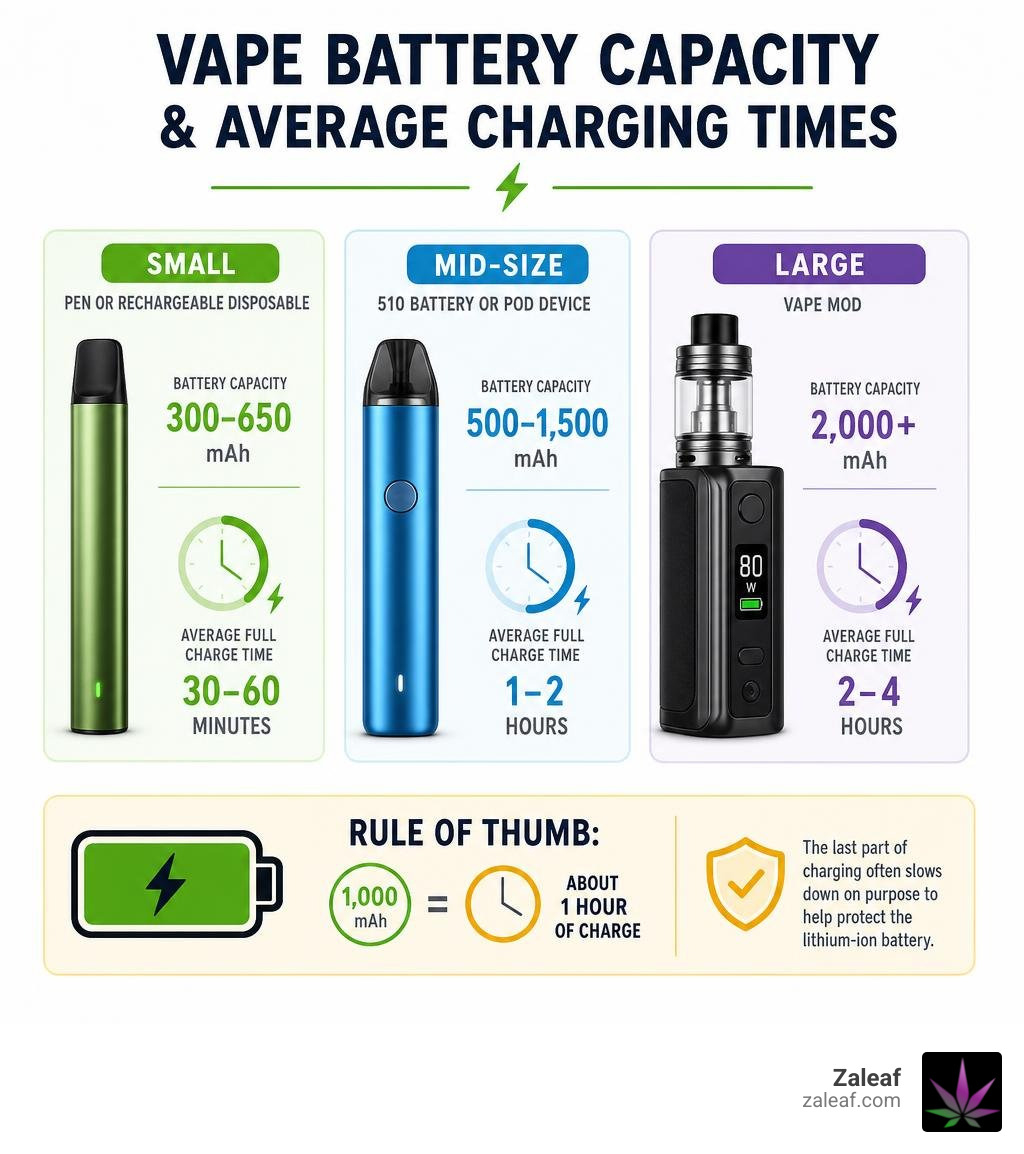
How long does a vape take to charge? For Zaleaf customers using rechargeable cannabis vape pens, 510 batteries, and compact rechargeable formats, most charging sessions take 30 to 90 minutes. A small Zaleaf-style pen or rechargeable disposable format usually charges fastest, while a larger Zaleaf-compatible battery with more capacity can take 1 to 2 hours or longer.
| Zaleaf charging setup | Typical battery size | Average full charge time |
|---|---|---|
| Compact rechargeable cannabis vape or small pen format | 300-650 mAh | 30-60 minutes |
| Zaleaf-compatible 510 battery or pod-style device | 500-1,500 mAh | 1-2 hours |
| High-capacity Zaleaf-compatible hardware | 2,000 mAh or more | 2-4 hours |
The exact time depends on the battery capacity listed for your device, the supported charging input, cable condition, and heat. The last part of charging often slows down on purpose to help protect the lithium-ion battery inside your Zaleaf vape setup.
I'm Max Shemesh Zaleaf, CEO of Zaleaf, where my work in the cannabinoid industry centers on quality, transparency, and helping customers use cannabis hardware with confidence. Knowing how long does a vape take to charge can help you plan ahead, avoid unnecessary battery wear, and get a more reliable experience from your Zaleaf vape.
How Long Does a Vape Take to Charge by Zaleaf Device Type and Capacity
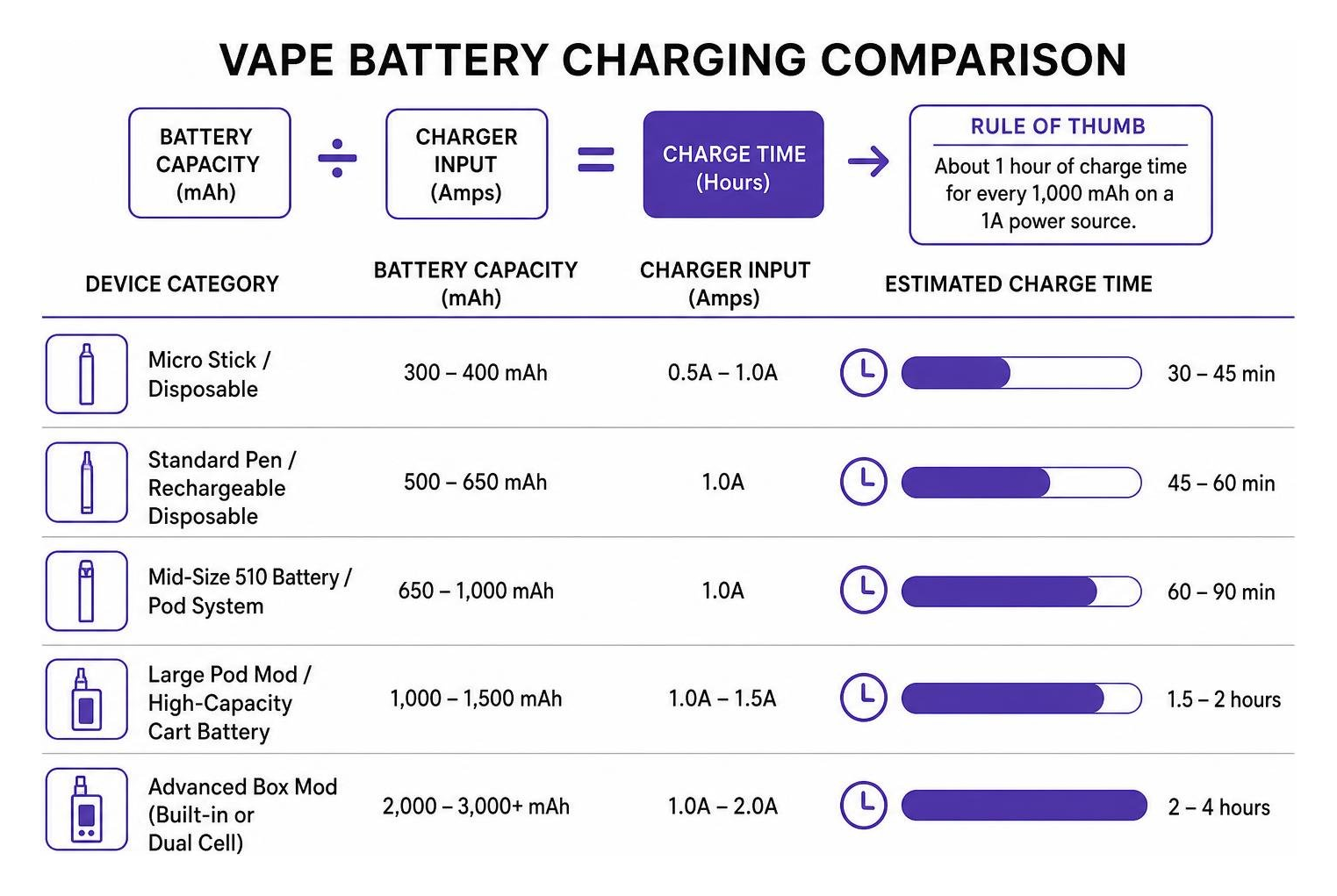
When trying to figure out how long does a vape take to charge, the first number to check on your Zaleaf vape hardware is battery capacity, measured in milliampere-hours, or mAh. A simple baseline rule of thumb is that a device needs roughly 1 hour of charge time for every 1,000 mAh of battery capacity when connected to a standard 1-amp power source.
Real-world charge speed also depends on how much current the internal charging board allows the battery to draw. At Zaleaf, our cannabis vape experience is built around reliable hardware care, clean charging habits, and consistent performance, so customers can spend less time waiting and more time enjoying carefully crafted cannabinoid and terpene profiles.
To estimate the charging time for your Zaleaf setup, compare your battery rating with the guide below:
| Zaleaf charging setup | Battery capacity (mAh) | Recommended charger input | Estimated charge time |
|---|---|---|---|
| Compact rechargeable cannabis vape format | 300 - 400 mAh | 0.5A - 1.0A | 30 - 45 minutes |
| Standard Zaleaf-style pen or rechargeable disposable format | 500 - 650 mAh | 1.0A | 45 - 60 minutes |
| Zaleaf-compatible 510 battery or pod system | 650 - 1,000 mAh | 1.0A | 60 - 90 minutes |
| Larger Zaleaf-compatible cart battery or pod-style setup | 1,000 - 1,500 mAh | 1.0A - 1.5A | 1.5 - 2 hours |
| High-capacity Zaleaf-compatible hardware | 2,000 - 3,000+ mAh | 1.0A - 2.0A | 2 - 4 hours |
For an in-depth dive into setup techniques and basic battery mechanics for Zaleaf vape users, check out our guide on Vape pen charging.
How Long Does a Vape Take to Charge for Zaleaf Disposable Vapes and Small Pens
Zaleaf disposable vape formats and sleek stick-style batteries are designed for convenience, portability, and simple charging routines. These compact units typically use internal lithium-ion cells ranging from 300 mAh to 650 mAh.
A 500 mAh Zaleaf-style rechargeable disposable or compact pen paired with a dependable 1A USB power source usually reaches a complete charge in roughly 30 to 45 minutes. Devices in the 600 mAh to 650 mAh range often take around 36 to 60 minutes, depending on the cable and the charging circuit. Because these Zaleaf formats use smaller power reservoirs, you can often top them up during a short break. Learn more detailed steps in our Juice it up the ultimate guide to charging disposable vape pens.
Charging Times for Zaleaf 510 Thread Batteries and Pod Systems
Zaleaf-compatible 510-thread cart batteries and pod-style setups balance pocket-friendly sizing with enough battery life for repeat sessions. These devices generally fall between 500 mAh and 1,500 mAh, depending on the specific hardware.
Expect a 650 mAh Zaleaf-compatible palm battery to require roughly 60 to 90 minutes from empty to full. A larger 1,000 mAh Zaleaf-compatible pod or cart battery may require approximately 90 to 120 minutes on a standard 1A charger. If your Zaleaf hardware instructions list a higher supported input, such as 1.5A, full charging may finish sooner while staying within the device's intended limits.
To keep your Zaleaf cartridge setup working at peak performance, explore our detailed resource on 510 thread battery charging and check out our updated 510 battery charger guide 2026.
Charging Duration for High-Capacity Zaleaf-Compatible Hardware
Some Zaleaf customers prefer higher-capacity batteries for longer sessions between charges. These larger Zaleaf-compatible setups can be rated at 2,000 mAh to 4,000 mAh or more, which naturally increases the time needed to refill the battery.
When charging a high-capacity Zaleaf-compatible device through its built-in USB port, expect a charge time between 2 and 4 hours. Always follow the charging input printed on the device or included with the hardware, and avoid pushing extra power into a battery that was not designed for it. For an overview of battery formats and safe hardware selection for cannabis vape users, read about Different vape battery types.
Key Factors That Influence Zaleaf Vape Charging Speed

Have you ever wondered why two Zaleaf-compatible vape batteries with similar mAh ratings can take different times to charge? How long does a vape take to charge is governed by several interacting variables beyond the battery number printed on the device:
- Charger amperage: The power brick you use dictates how much current is available. A computer USB port may provide roughly 0.5A, while a standard 5V/1A wall adapter can provide a steadier charge for many Zaleaf vape setups.
- Cable quality and resistance: Worn-out, thin, or unusually long USB cables can introduce electrical resistance. Higher resistance can cause voltage drops, forcing your Zaleaf device's charging chip to reduce incoming current.
- USB-C vs. Micro-USB ports: Modern USB-C connections can support stable power delivery and a firmer physical connection than older Micro-USB ports, which can help Zaleaf customers avoid loose-cable charging interruptions.
- Thermal conditions: Lithium-ion batteries are sensitive to ambient temperatures. Charging in a hot environment above 85 F can trigger safeguards that lower charge speed to help prevent overheating.
- The tapering phase: Zaleaf vape batteries, like other lithium-ion powered cannabis hardware, do not charge at a fixed speed from start to finish. Internal circuits supply stronger current through most of the charge, then slow down near the end to protect battery health.
To find the right power accessories for your Zaleaf setup, browse our tips on Finding your perfect vape pen charger cable and universal options and check your cord compatibility with a Vape charger type c.
Can You Use a Phone Fast Charger on a Zaleaf Vape Battery?
It can be tempting to connect a Zaleaf vape pen to a high-wattage phone charging brick. However, using ultra-high-wattage quick chargers can be risky unless your Zaleaf hardware instructions explicitly allow that input.
Most compact cannabis vape batteries are designed around a steady 5V/1A or 5V/2A power input. While many smart chargers automatically negotiate lower output, some fast-charging setups can create extra heat or deliver power in a way the vape battery was not designed to handle. That thermal stress can shorten battery lifespan and reduce charging reliability.
For maximum safety and performance, plug your Zaleaf vape into the charger type recommended for the device, such as a standard 5V/1A wall adapter or a reliable computer USB port when appropriate. Learn more about optimal charging practices in our article on Fast charge cannabis battery.
How to Tell When Your Zaleaf Vape Is Fully Charged and Charging Safety Rules

Knowing when your Zaleaf device has finished charging helps prevent unnecessary heat exposure and protects internal components. Zaleaf-compatible vape hardware commonly communicates battery status with simple visual signals:
- LED color shifts: The most common system uses a color-changing light on the base or button. The indicator light typically stays solid red or amber while charging, turning solid green, blue, or white once full capacity is reached.
- Pulsing vs. solid light: Some rechargeable Zaleaf vape formats pulse slowly while pulling power and switch to a steady, solid light when complete.
- Automatic light shutoff: On many minimalistic pens, the LED light glows continuously during charge and turns off completely when charging finishes.
- Digital display screens: Some Zaleaf-compatible pod devices and higher-capacity batteries display battery percentages along with an animated battery icon that stops moving when the cell reaches 100%.
Recognizing these charge completion signals helps ensure you disconnect your Zaleaf vape at the ideal time to maintain performance and hardware safety. For broader lithium-ion battery safety background, Zaleaf customers can also review UL's lithium-ion battery safety guidance.
Hazards of Overcharging and Improper Power Sources
Leaving a Zaleaf vape plugged in long after it reaches 100% capacity, especially overnight, can contribute to premature battery wear. Modern vape hardware often includes built-in overcharge protection, but leaving any Zaleaf-compatible battery connected continuously can expose the cell to avoidable warmth and trickle-current pressure.
Overcharging and using unapproved high-amp power sources can create clear risks:
- Reduced overall battery lifespan: Heat exposure accelerates chemical degradation, reducing total charge cycles.
- Burnt oil flavor: Prolonged heat transfer from a charging port to an attached cartridge can thin concentrates, oversaturate the internal coil, and degrade delicate terpene profiles that Zaleaf designs for mood-specific effects.
- Battery stress: Damaged or uncertified lithium cells exposed to extreme heat can swell, leak, or suffer internal shorts.
Always charge your Zaleaf vape on a stable, non-flammable surface away from bedding, direct sunlight, and other heat sources.
Is Passthrough Vaping Safe While the Device Is Plugged In?
Passthrough vaping refers to drawing from your vape while it remains connected to its charging cable. Even if a Zaleaf-compatible device includes circuitry designed to manage charging during use, we strongly advise against vaping while charging.
Taking heavy puffs while plugged in can create immediate demand on both the charging board and the battery cell. This double load can generate heat, affect voltage stability, and trigger safety cutoffs. To protect your Zaleaf hardware, unplug the device briefly, take your puff, and resume charging afterward.
Troubleshooting a Zaleaf Vape That Charges Slowly or Won't Charge
If your Zaleaf device is taking far longer than expected to charge, or fails to respond when plugged in, do not throw it away just yet. Many charging problems come from simple connection issues, cable wear, or residue near the charging contact rather than permanent battery failure.
If your Zaleaf device seems stuck on a low charge level, review our comprehensive troubleshooting guide for a Battery not charging to fix common connection issues fast.
Cleaning Ports and Checking Connection Points
Pocket lint, dust, and sticky oil residue are the most common culprits behind charging failures in Zaleaf vape setups. Over time, debris can get compacted into USB ports or settle on 510 charging threads, blocking proper electrical contact.
Follow these simple steps to clean your Zaleaf charging connection safely:
- Disconnect and power down: Always unplug your Zaleaf vape and turn it off completely before inspecting or cleaning the ports.
- Inspect with a flashlight: Shine a light directly into the USB port or threaded collar to check for compacted lint, dirt, or residue buildup.
- Gently remove debris: Use a dry, non-metallic tool like a wooden or plastic toothpick. Carefully lift pocket lint from the corners of the USB port without bending internal pins.
- Wipe down contacts: For 510 threads or magnetic charging contacts, lightly dip a cotton swab in high-purity isopropyl alcohol. Gently wipe away sticky oil or film, then let the area dry completely for 5 minutes before plugging in.
- Test a different cable and port: Cables degrade internally over time. Swap out your cord for a high-quality USB-C or compatible cable connected directly to the charger type recommended for your Zaleaf device.
Essential Habits to Maximize Zaleaf Vape Battery Lifespan
Most lithium-ion batteries used in rechargeable Zaleaf vape hardware provide 300 to 500 charge cycles before experiencing noticeable capacity loss. With typical daily use, this often translates to roughly 6 to 12 months of solid operational life. Following safe charging habits can extend your Zaleaf hardware's lifespan and help preserve consistent flavor delivery.
To help you get the most out of every Zaleaf charge, adopt these proven daily habits:
- Avoid deep discharges: Do not let your Zaleaf vape drain to 0% completely when you can avoid it. Lithium cells experience less chemical strain when recharged around 20% to 30% remaining power.
- Unplug near full: If you are nearby when your Zaleaf device is charging, unplugging it right as it reaches full can reduce avoidable heat exposure.
- Maintain moderate temperatures: Never leave a Zaleaf vape in a parked vehicle, on a sunny windowsill, or exposed to freezing conditions. Charge and store hardware around room temperature whenever possible.
- Keep connectors clean: Wipe down 510 thread connections regularly to prevent resistance spikes caused by oil residue.
For a full breakdown on maintaining Zaleaf battery health over time, explore our Vape battery lifespan complete guide and learn about Optimizing battery life.
How Long Does a Zaleaf Vape Take to Charge After Long-Term Storage?
When a Zaleaf vape sits unused in a drawer or bag for several weeks or months, its lithium battery slowly self-discharges. If the charge drops below a critical safety threshold, the cell can enter a protective low-power state.
When waking up a stored Zaleaf device, connecting it to power might not trigger an immediate light signal. It can take 10 to 20 minutes of trickle charging before the internal circuit board wakes up and displays standard charging signals. A battery coming out of long-term storage may take 20% to 30% longer to complete its first charge cycle.
If you plan to store your Zaleaf vape for an extended period, leave the battery around 40% to 60% capacity and place it in a cool, dry location. Never store a vape completely empty or fully charged for months at a time. For more tips on long-term Zaleaf hardware health, check out our guide on How long does a vape pen battery last.
Frequently Asked Questions About Zaleaf Vape Charging
How long does a 500 mAh Zaleaf vape battery take to charge?
A 500 mAh Zaleaf-compatible vape battery connected to a 1-amp power supply typically takes 45 to 60 minutes to reach a full charge from completely empty. If powered by a lower 0.5A computer USB port, it may take 60 to 75 minutes.
Why does the last 10 percent of Zaleaf vape charging take so long?
The final portion of a charge slows down due to constant-voltage tapering. As the lithium-ion cell in your Zaleaf vape setup approaches full capacity, the internal charging controller intentionally reduces incoming amperage. This helps limit heat and protect long-term battery health.
How long does a full Zaleaf vape charge last between uses?
How long a single Zaleaf charge lasts depends on usage habits, puff duration, voltage setting, and battery capacity. Light to moderate users drawing on a 650 mAh Zaleaf-compatible battery might go 2 to 3 days between charges. Heavier use or smaller-capacity batteries may require more frequent top-ups.
Conclusion
Understanding how long does a vape take to charge comes down to matching your Zaleaf battery capacity with the correct charger and avoiding unnecessary heat. Most compact Zaleaf rechargeable vape formats and small pen batteries recharge in 30 to 60 minutes, many Zaleaf-compatible 510-thread batteries require 1 to 2 hours, and high-capacity Zaleaf-compatible hardware can take 2 to 4 hours. By avoiding unsupported high-wattage fast chargers, keeping your charging ports clean, and unplugging your device once it is full, you can protect your Zaleaf hardware and enjoy consistent performance every session.
At Zaleaf, we believe that premium cannabinoid experiences start with reliable hardware, clean power, and transparent product quality. All of our 100% legal cannabis products feature carefully optimized cannabinoid and terpene profiles designed to deliver targeted mood-specific effects. We prioritize absolute transparency with rigorous 3rd party lab testing on every batch, delivering direct to your door with fast shipping and discrete packaging - no ID or medical card required.
Ready to elevate your session with clean power and premium flavor? Learn more about keeping your Zaleaf setup in top shape and explore our ultimate vape pen charging guide today!