

How to Charge 510 Thread Battery in 4 Easy-to-Follow Steps
Why Proper 510 Thread Battery Charging Makes or Breaks Your Vape Experience

510 thread battery charging is simpler than most people think — but doing it wrong is the number one reason batteries die early.
Here's the quick answer if you need it fast:
How to charge a 510 thread battery in 4 steps:
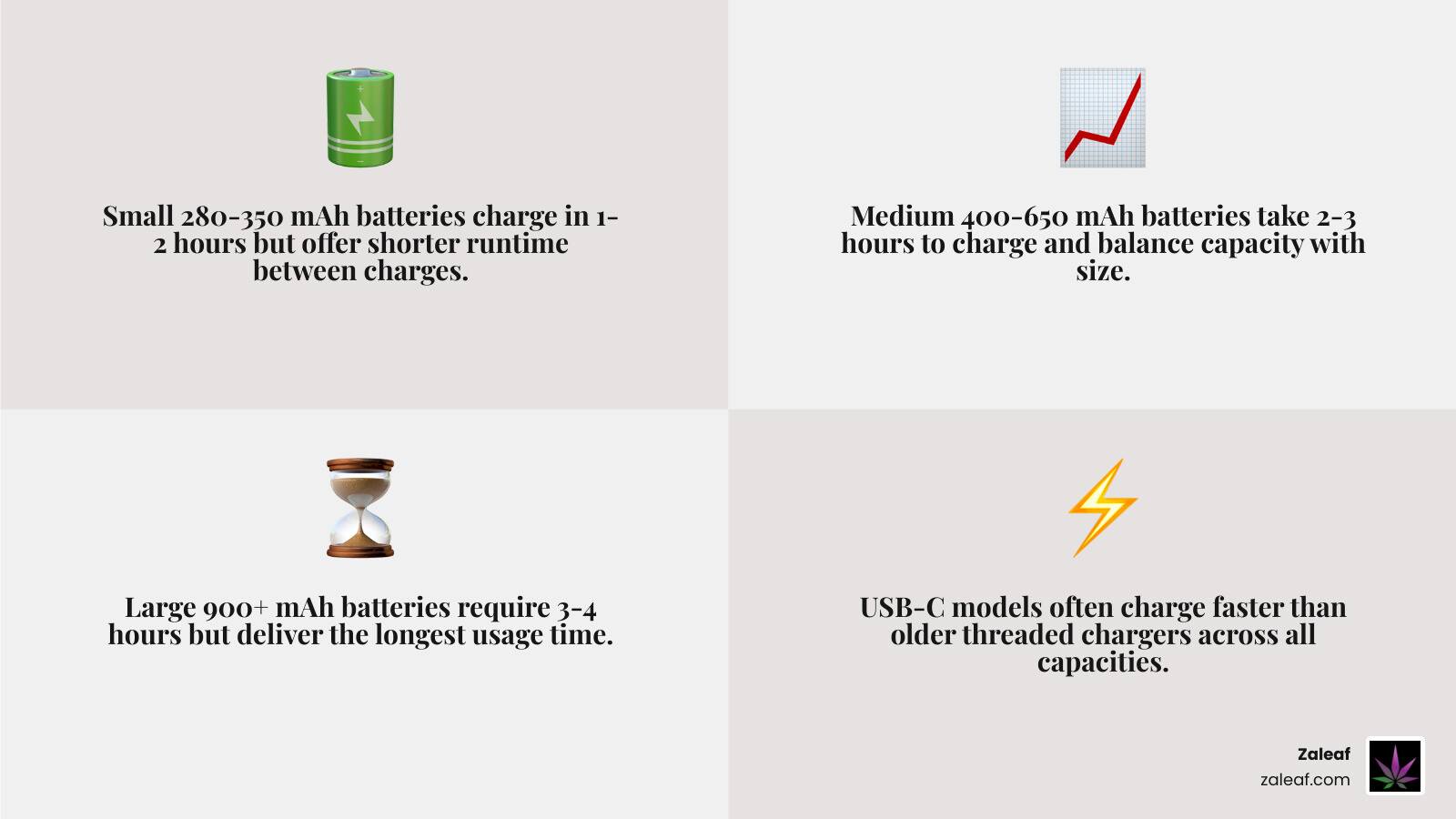
- Clean the connection points with a cotton swab and isopropyl alcohol
- Connect your charger to the power source first, then attach the battery
- Monitor the LED — red means charging, green means full
- Disconnect once fully charged and store at room temperature
Most 510 batteries charge in 1–2 hours depending on capacity. Never leave them charging overnight.
A 510 thread battery is the universal power source behind most vape cartridges on the market today. The "510" refers to a precise threading spec — 10 threads at 0.5mm pitch — that makes nearly every cartridge and battery interchangeable across brands. Inside is a rechargeable lithium-ion cell that's surprisingly sensitive to how you charge it. Get it right, and your battery can last 300–500 full charge cycles. Get it wrong, and you might be replacing it within weeks.
The good news: the right habits take less than a minute to build.
I'm Max Shemesh, owner and CEO of Zaleaf, and I've spent years in the cannabinoid industry helping customers get the most out of their devices — including mastering 510 thread battery charging to extend product life and improve every session. In the sections below, I'll walk you through exactly what to do, step by step.
The Science of 510 Thread Battery Charging
A 510 thread battery is a small rechargeable lithium-ion power source designed to run standard vape cartridges. The reason it became the industry default is simple: compatibility. When batteries and cartridges use the same 510 connection, users do not have to start from scratch every time they switch carts.
That standard matters, but the charging system matters just as much. Inside the battery are a lithium-ion cell, a control chip, a connection plate or center pin, and a charging interface. If any one of those parts gets dirty, bent, overheated, or fed the wrong power, charging problems start fast.
For a deeper foundation on battery design, we recommend reading An Essential Guide To Cannabis Vape Batteries and Different Vape Battery Types.

A few key things to know:
- 510 means 10 threads at 0.5 mm pitch
- Most 510 batteries use lithium-ion cells
- Lithium-ion batteries prefer steady, low-stress charging
- Heat, overcharging, and deep discharging shorten lifespan
- Dirty threads are one of the most common reasons a battery appears "dead"
Modern Charger Types in 2026
In 2026, there are three main charger styles for 510 batteries.
USB-C
USB-C is now the modern favorite. It is faster, more durable, and easier to use than older formats. Research consistently shows USB-C charging can be 30-50% faster than Micro-USB or legacy threaded chargers. It is also rated for more plug cycles, which means the port tends to hold up better over time.
Best for:
- Newer 510 batteries
- Faster charging
- Users who want a more durable charging port
Micro-USB
Micro-USB still appears on many older or budget-friendly batteries. It works fine when paired with the correct 5V power source, but it is slower and physically less durable than USB-C.
Best for:
- Older pen batteries
- Backup devices
- Users replacing an existing cable rather than upgrading hardware
eGo or threaded chargers
These screw directly into the 510 battery. They still work, but they need a little more care because over-tightening can push the center pin down and stop the battery from charging properly. One of the easiest ways to avoid trouble is to plug the charger into power first, then gently thread the battery on.
If you want to compare charging speeds and modern options, see Fast Charge Cannabis Battery.
Understanding mAh and Capacity
mAh stands for milliampere-hour. In plain English, it tells us how much energy the battery can store.
Higher mAh usually means:
- Longer use between charges
- Longer charging time
- Slightly larger battery size
Lower mAh usually means:
- Smaller, slimmer battery
- Shorter runtime
- Faster charging
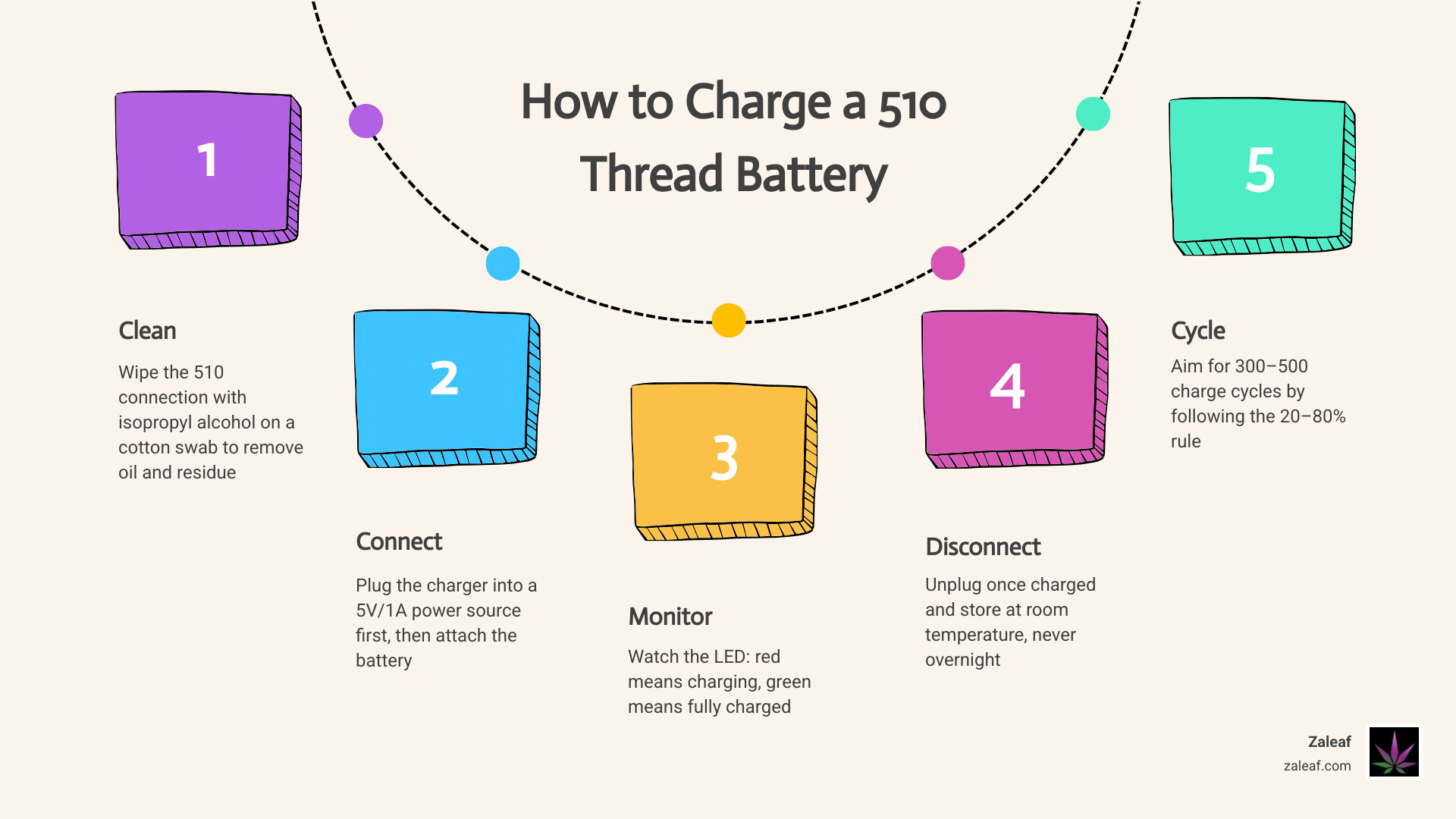
Here is a practical guide:
| Battery size | Typical capacity | Average charge time |
|---|---|---|
| Small | 280-350 mAh | 1-2 hours |
| Medium | 400-650 mAh | 2-3 hours |
| Large | 900+ mAh | 3-4 hours |
Some USB-C models charge faster than these ranges, while older threaded chargers can take longer. As a rule, most 510 batteries still land in the 1-2 hour window.
For more on how battery output and capacity work together, check out Variable Voltage Vape Battery.
4 Steps to Charge Your 510 Battery Safely
Charging a 510 battery is easy, but a few small habits make a big difference. The process below lines up with the safety-first advice we recommend for maintaining your device and ensuring a consistent experience.

Step 1: Clean the Connection Points
Before charging, inspect the battery threads, center contact, and charging port if it has one. Oil residue is sneaky. It gets everywhere, then acts surprised when your battery stops working.
Use:
- A cotton swab
- 90%+ isopropyl alcohol if available
- A dry swab afterward if needed
What to do:
- Turn the battery off if it has a power button
- Lightly clean the threads and contact points
- Let everything dry fully before charging
Do not:
- Pour alcohol directly into the battery
- Charge while still wet
- Scrape aggressively with metal tools
This simple step solves a surprising number of charging issues. For more battery buying and care tips, see The Essential 510 Thread Battery Buyers Guide.
Step 2: Connect to the Power Source
Now connect the charger correctly.
For USB-C or Micro-USB batteries:
- Plug the cable into the battery
- Connect the other end to a standard 5V/1A power source
- Use a wall adapter or low-output USB port when possible
For threaded chargers:
- Plug the charger into power first
- Gently screw the battery onto the charger
- Stop at finger-tight, never crank it down
The safest charger choice is:
- The original charger that came with the battery, or
- A replacement that matches the original specs exactly
Avoid:
- Phone fast chargers that output higher voltage
- Random no-name chargers with unclear ratings
- Damaged cables
- Tablet bricks or laptop USB-C ports if the battery maker does not recommend them
Most 510 batteries are designed around 5V charging. If the charger is pushing more than that, you risk damaging the control board.
For more charging basics, read Charging 510 Battery.
Step 3: Monitor the LED Indicators
Once connected, watch the light. On many batteries and chargers:
- Red light means charging
- Green light means fully charged
- No light can mean full charge, bad connection, or dead power source
- Slow blinking usually means charging is in progress
- Rapid blinking usually means a problem
Common blink codes vary by brand, but many 510 batteries follow patterns like:
- 5 blinks: low battery
- 3 blinks: short circuit or cartridge issue
- 2 blinks: protection mode after an overly long draw or overload
The key point: do not ignore blinking. A blinking battery is trying to tell you something, even if it is not being very poetic about it.
If you want a better grasp of indicators and power behavior, see Power Up Your Vape Finding The Right Variable Voltage Battery.
Step 4: Disconnect and Store
Once the light turns green or the battery stops blinking and indicates full charge, unplug it. Yes, even if you are tempted to leave it "just a little longer." That is how overnight charging starts.
Best practice:
- Disconnect within about an hour of full charge
- Let the battery cool if it feels warm
- Store it at room temperature
- Keep it out of direct sun, hot cars, and freezing temperatures
For daily use, many battery experts recommend keeping lithium-ion batteries between about 20% and 80% charge most of the time. You do not have to obsess over it, but regularly draining to 0% and camping at 100% can wear the battery out faster.
More battery-life tips are in Charge On Maximizing Your Vape Batterys Life And Speed.
Troubleshooting and Fixing 510 Thread Battery Charging Failures
Even a good battery can act up. Most charging failures come from a few repeat offenders: dirty contacts, the wrong charger, a pushed-down center pin, or a battery that has simply reached the end of its life.
For a deeper troubleshooting guide, visit Battery Not Charging.
Common 510 thread battery charging indicators
Here is what the most common lights usually mean:
- 5 blinks: battery is low and needs charging
- 3 blinks: short circuit, poor cartridge connection, or incompatible cart
- 2 blinks: protection triggered, often after overheating or too long of a draw
- Solid red: actively charging
- Solid green: fully charged
- Rapid blink while charging: bad contact, dirty threads, faulty charger, or temperature issue
If your battery will not charge:
- Try a different cable
- Try a different 5V power source
- Clean all connection points
- Remove the cartridge while charging if recommended by the maker
- Let the battery sit on the charger for 10-15 minutes if it has been dead for a long time
A battery that sat uncharged for months may need a few minutes before the LED wakes up.
Fixing Connection Plate Issues
One of the most common threaded-charger problems is a pushed-down center pin or connection plate. This often happens from over-tightening the charger or cartridge.
Signs:
- Charger shows green immediately even though battery is dead
- Battery charges only if held at an angle
- Cartridge works inconsistently
- No contact between battery and charger
Possible fix:
- Power off the battery
- Use a wooden toothpick or other non-metal tool
- Very gently lift the center pin a tiny amount
- Do not pry hard or twist aggressively
- Re-test with the correct charger
If the pin does not move, looks damaged, or the battery gets hot, stop there. A forced repair is a great way to turn a small problem into a dead battery.
This issue shows up often on screw-on chargers and older pen batteries. For related charging habits and device care, see Juice It Up The Ultimate Guide To Charging Disposable Vape Pens.
Maintenance Tips for Long-Term Battery Health
A 510 battery is not high-maintenance, but it does appreciate basic respect. Think of it like a houseplant that prefers less drama.
Most lithium-ion 510 batteries last around 300-500 full charge cycles before noticeable degradation. With proper habits, many users get 6-12 months of solid daily use, while lighter users may stretch that to 18-24 months.
Simple maintenance tips:
- Clean the threads and port every 2-4 weeks
- Use only compatible chargers
- Avoid overnight charging
- Recharge around 15-30% instead of waiting for total death
- Keep the battery at room temperature
- Do not leave it in a hot car
- Avoid using it while charging unless the device specifically supports pass-through charging
- Do not overtighten cartridges
If your battery starts showing swelling, discoloration, random shutdowns, or major heat during charging, replace it. Those are not personality quirks. Those are warning signs.
For more care tips, read Optimizing Battery Life.
Best practices for 510 thread battery charging
If you want the short list of habits that actually matter most, here it is:
- Use the included charger or a like-for-like replacement
- Stick to 5V charging
- Charge on a non-flammable surface
- Unplug when full
- Keep charge between 20-80% when practical
- Do not use phone fast chargers unless the battery specifically supports them
- Upgrade to USB-C when possible for faster, more durable charging
USB-C is increasingly the smart long-term choice in 2026. It charges faster, the port is generally tougher, and you avoid the wear that repeated screw-on charging can cause.
If you are comparing hardware features overall, Best 510 Battery is a useful next read.
Frequently Asked Questions
Why is my 510 battery blinking while charging?
Usually because something is wrong with the connection or charger. Start with the simple fixes:
- Clean the threads or charging port
- Try a different cable
- Check the power source
- Make sure the battery is not over-tightened
- Let it cool down if it feels hot
A slow blink may simply mean it is charging. A rapid blink usually means a fault.
Can I use my phone's fast charger for my vape?
Usually, no. Most 510 batteries are designed for standard 5V charging. Fast chargers may deliver higher voltage and can damage the battery's internal circuitry. Unless the battery manufacturer clearly says fast charging is supported, stick with a basic 5V charger.
How long does a full charge typically last?
That depends on capacity and usage.
General ranges:
- 280-350 mAh: lighter use, often enough for occasional sessions
- 400-650 mAh: good middle ground for daily users
- 900+ mAh: best for heavier use and fewer charging breaks
In terms of charging time, most 510 batteries fill in 1-2 hours, though larger models can take 3-4 hours. In terms of runtime, a mid-size battery may last a day or more for many users, while heavy users may recharge daily.
Conclusion
Proper 510 thread battery charging is mostly about doing the little things right: use the correct charger, keep the contacts clean, watch the LED, and unplug when the battery is full. Those habits can extend battery life by 10-20% compared with careless charging, and they reduce the chances of the classic "why is this thing blinking at me?" moment.
If you want to keep learning, explore the Zaleaf Knowledge Base. We share practical guides on batteries, cartridges, and device care to help you get more life out of every setup.
And when you shop with us, you can expect 100% legal cannabis products, fast shipping, discrete packaging, mood-focused cannabinoid and terpene profiles, and 3rd party tested quality. No ID or medical card required.