

How to Charge Vape Pen in 5 Simple Steps
Why Proper Vape Pen Charging Makes or Breaks Your Experience

Vape pen charging is one of the most important — and most overlooked — parts of owning a vape pen. Do it right, and your battery lasts longer, performs better, and stays safe. Do it wrong, and you risk shortened battery life, inconsistent hits, or even a device that stops working altogether.
Here's the quick answer for how to charge a vape pen:
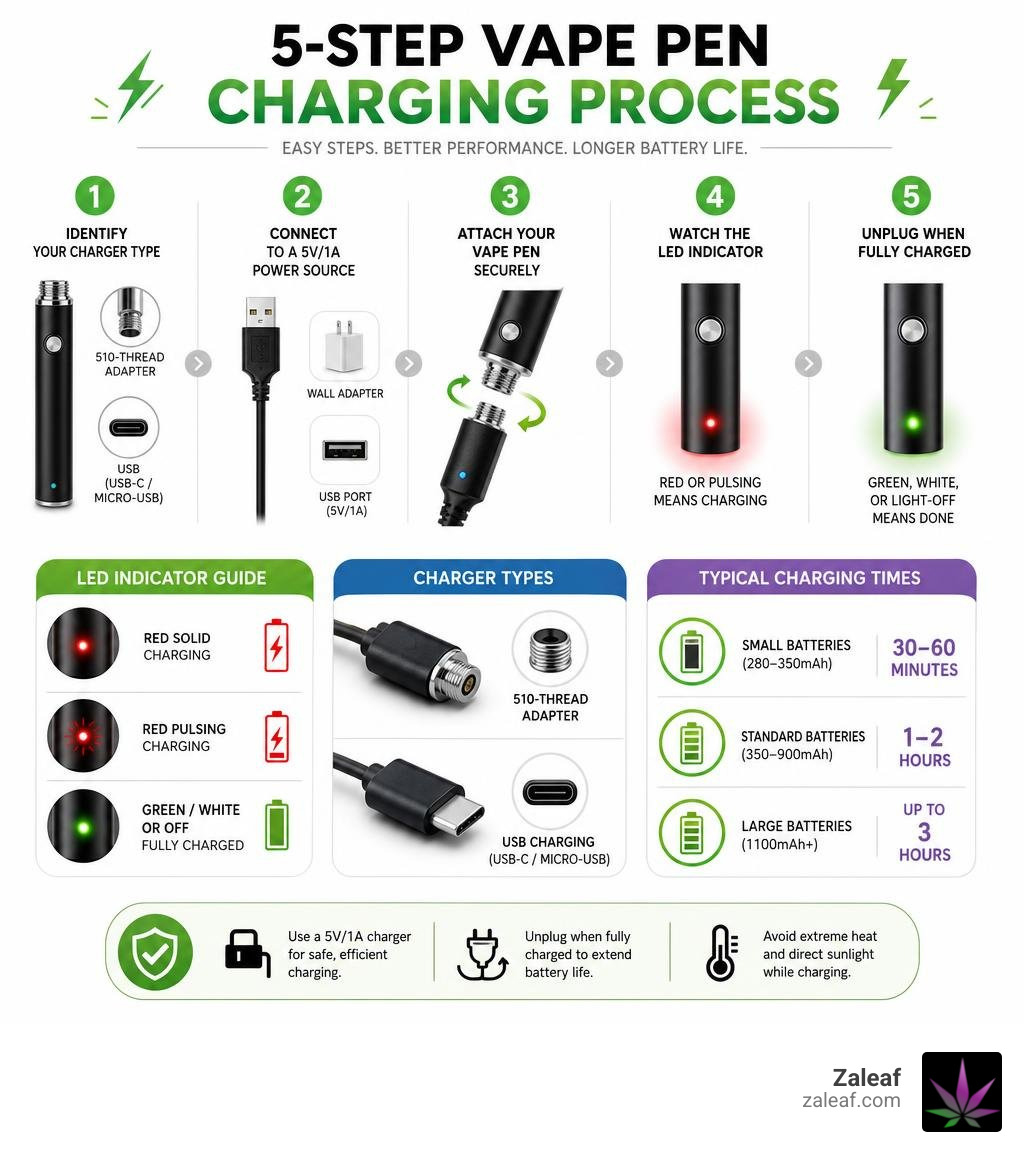
- Identify your charger type — 510-thread adapter or USB (USB-C / Micro-USB)
- Connect the charger to a 5V/1A USB port or wall adapter
- Attach your vape pen to the charger securely, without over-tightening
- Watch the LED indicator — red or pulsing means charging
- Unplug when fully charged — green, white, or light-off means done
Most standard vape pens take 1 to 2 hours to fully charge. Small pens (280–350mAh) can finish in as little as 30–60 minutes, while larger batteries (1100mAh+) may need up to 3 hours.
The stakes are real. Lithium-ion batteries — the kind inside nearly every vape pen — typically handle around 300 to 500 full charge cycles before capacity starts to drop. That's roughly a year of daily use. Simple habits, like unplugging when full and avoiding fast chargers, can meaningfully extend that lifespan.
Whether you just got your first pen or you've been vaping for a while, this guide walks you through every step clearly and simply.
I'm Max Shemesh, Owner and CEO of Zaleaf, where I've spent years helping customers get the most out of their cannabis vaping experience — including mastering vape pen charging for better battery performance and longer device life. Let's walk through everything you need to know, step by step.
The 5-Step Guide to Charging Your Vape Pen
Charging a vape pen might seem as simple as plugging in a smartphone, but these smaller, more sensitive lithium-ion batteries require a bit of extra care. Following a structured charging routine ensures that you don't stress the battery cells or damage the delicate internal connections.
Here is our comprehensive, step-by-step guide to doing it right:
Step 1: Identify Your Battery and Charger Type
Before you plug anything in, you need to know what kind of connection your device uses. Vape pens generally fall into two categories:
- Direct-Port Charging: These pens feature a built-in USB-C or Micro-USB port directly on the bottom or side of the battery. You simply plug a standard USB cord directly into the pen. USB-C is rapidly becoming the standard in 2026 due to its durability and reversible design.
- Screw-On (eGo/510-Thread) Charging: These devices do not have a built-in charging port. Instead, you must unscrew your cartridge and screw the battery directly into a specialized 510-thread USB adapter. To understand the differences in how these components interact, you can read more about 510-Thread Chargers and USB Vape Chargers: What They Are and How to Use Them.
Step 2: Prepare the Power Source
Always plug your USB cable or 510-thread adapter into a low-output power source. Excellent options include a computer USB port, a video game console, or a certified 5V/1A wall adapter. Avoid using high-wattage fast-charging blocks designed for modern smartphones or tablets, as these can deliver too much current and overheat your vape battery.
Step 3: Clean and Connect Your Device
If you are using a 510-thread charger, make sure the threads on both the battery and the charger are clean and dry. Gently screw the battery into the charger. Crucial tip: Screw it in until it is snug, but do not over-tighten it. Over-tightening can depress the small metal contact pin inside the threads, breaking the connection and preventing the pen from charging in the future. If your pen uses a direct USB-C or Micro-USB port, gently insert the cable into the port.
Step 4: Monitor the LED Indicator Lights
Once connected, the vape pen's LED light (or the light on the 510 USB adapter itself) should turn on. A steady red light or a pulsing light usually indicates that the battery is successfully drawing power and actively charging. Keep the device on a flat, hard, non-flammable surface while it charges.
Step 5: Disconnect Immediately When Complete
Once the LED light changes color (typically turning solid green, white, or turning off completely), your vape pen is fully charged. Unplug the cable or unscrew the battery from the adapter right away. Avoiding leaving the device plugged in for hours after it reaches 100% helps preserve the overall lifespan of the battery.
| Feature / Metric | 510-Thread Screw-On Charging | Direct Port Charging (USB-C / Micro-USB) |
|---|---|---|
| Connection Method | Screws directly into the 510 cartridge threads | Plugs directly into a port on the device casing |
| Durability | High (threads are sturdy, protecting internal solder joints) | Moderate (ports can become loose or collect pocket lint) |
| Convenience | Requires unscrewing the cartridge first | Cartridge can remain attached while charging |
| Typical Charging Speed | 1 to 2 hours (often limited to 0.5A) | 45 minutes to 1.5 hours (supports up to 1A) |
| Replacement Ease | Requires a brand-specific 510 USB adapter | Uses universal, widely available USB cables |
Best Practices for Safe Vape Pen Charging

When it comes to lithium-ion batteries, safety should always be your top priority. Improper charging is the leading cause of premature battery failure, decreased capacity, and, in rare cases, safety hazards like overheating or swelling. By establishing safe charging protocols, you protect your investment and keep your sessions worry-free.
First, never leave a charging vape pen unattended or plug it in overnight. While most modern vape pens feature basic overcharge protection circuits, these electronic safeguards are not infallible. If a component fails or the device begins to overheat, being nearby allows you to unplug it immediately before any real damage occurs.
Second, always charge on a hard, flat, non-flammable surface. Avoid placing your charging vape on beds, sofas, carpets, or under pillows. These soft materials trap heat, which restricts airflow around the device and can cause the battery to run dangerously hot. A kitchen counter, wooden desk, or ceramic tile are ideal charging spots.
Third, mind the temperature of your charging environment. Ideally, you should charge your vape pen in a space that stays between 50°F and 85°F (10°C to 30°C). Extreme cold or high heat can permanently degrade the battery cells. Never leave your vape pen charging in a hot car during the summer or near a freezing window in the winter. For a deeper dive into safe charging limits and power source guidelines, take a look at this guide on how to Learn How Long to Charge Vape Pen for Optimal Use.
Finally, always use a dedicated low-output power source. A standard 5V/1A USB wall adapter or a computer USB port provides the stable, lower amperage that small vape batteries are designed to handle. High-amperage fast-chargers push too much energy into the battery too quickly, which leads to thermal stress and shortens the battery's overall lifespan.
How Battery Capacity (mAh) Affects Vape Pen Charging
A battery's capacity is measured in milliampere-hours (mAh). This number tells you how much energy the battery can hold and directly influences how long it takes to charge:
- Small Pen Batteries (280mAh – 350mAh): These ultra-compact, lightweight pens are highly portable but hold less charge. Because of their small capacity, they charge incredibly quickly — typically reaching a full charge in 30 to 60 minutes when using a standard 1A source.
- Medium Pen Batteries (650mAh – 900mAh): Often found in variable-voltage vape pens, these batteries offer a great balance between size and battery life. They generally take 1 to 2 hours to fully charge.
- Large Batteries and Mods (1100mAh+): These high-capacity devices are built for heavy use and can easily last multiple days on a single charge. However, their larger capacity means they require more time on the charger, usually taking 2 to 3 hours. If you are using a removable 18650 battery in an external charger, it can take up to 3 hours to top off completely.
The type of vape pen you use also plays a role in how you should manage your battery. For example, standard voltage pens are simple and consistent, while variable-voltage pens allow you to adjust the temperature settings. Adjusting your variable-voltage pen to a higher voltage setting drains the battery much faster, meaning you will find yourself charging it more frequently.
Even modern disposable vapes now frequently feature USB-C charging ports. Because disposable cartridges are often pre-filled with thick oils or distillates, manufacturers include rechargeable batteries to ensure you can fully vaporize every last drop of oil before the battery dies permanently.
Understanding Different Vape Pen Charging Indicators
Almost every rechargeable vape pen uses an LED light system to communicate its battery status. Decoding these signals is key to knowing when your device is ready for action:
- Pulsing or Flashing Light: When you first plug your vape pen in, a pulsing or steadily flashing light (often red or blue) indicates that the device is successfully drawing power and is actively charging.
- Color-Coded Progress: Many modern devices use color-coded lights to show how much charge has accumulated. For example, a red light might mean the battery is between 0% and 30% charged, a blue or yellow light represents 30% to 70% capacity, and a green or white light means it has passed 70%.
- The "Full Charge" Signal: Once the battery reaches 100%, the LED behavior will change. On some devices, the light will turn a solid, non-flashing green or white. On other models, the light will simply turn off entirely. To see how these indicators work on specific popular devices, you can review an official ePen User Guide to understand standard manufacturer light patterns.
Troubleshooting: What to Do If Your Vape Pen Won't Charge
It can be incredibly frustrating to plug your vape pen in, wait an hour, and realize it hasn't charged at all. Fortunately, most charging failures are caused by simple, easily fixable external issues rather than a broken battery. Before you throw your device away, walk through these troubleshooting steps to get things working again. For a comprehensive checklist of fixes, you can consult this guide on Why Won't My Vape Pen Charge? 7 Easy Fixes & Tips.
Troubleshooting Your Vape Pen Charging Issues
If your vape pen is plugged in but the indicator light isn't turning on, start with the easiest variables first:
- Verify the Power Source: Wall outlets can fail, and some laptop USB ports go into sleep mode when the computer is idle. Try plugging your charger into a different USB port or a known working wall outlet.
- Swap the Cable and Adapter: USB cables are prone to internal wear and tear, especially if they are bent or coiled tightly. Try using a different, shorter USB cable or a different 1A wall adapter to see if the connection returns.
- Check for "Deep Discharge": If you leave a vape pen unused in a drawer for several months with a dead battery, it can enter a "deep discharge" state. When this happens, the battery's internal protection circuit triggers, making it temporarily unresponsive. If you plug it in and see no lights, leave it connected to a safe power source for at least 20 to 30 minutes. Often, the battery will slowly revive and the charging light will finally turn on.
- Inspect the Port for Debris: If you carry your vape pen in your pocket or purse, lint, dust, and debris can easily collect inside the USB-C or Micro-USB port. This compressed debris blocks the charger's pins from making physical contact with the port. Use a wooden toothpick or a clean, dry toothbrush to gently clear out any pocket lint from the port, then try plugging the cable back in.
Fixing Recessed Pins and Dirty Contacts
For 510-thread vape pens, the connection between the battery and the charger is incredibly sensitive. If this connection is blocked, your pen won't charge, and you might see the LED light blink rapidly when you plug it in.
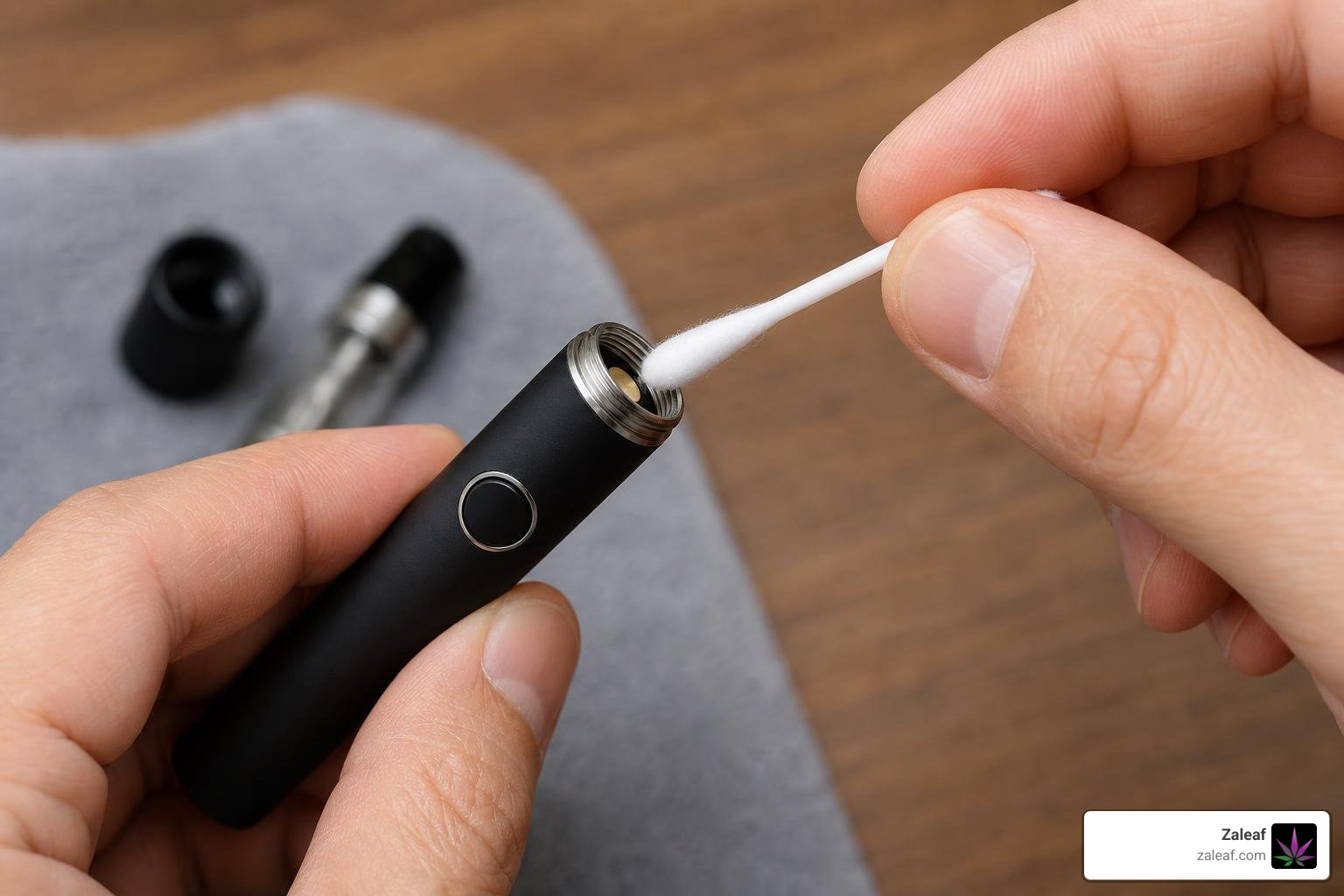
- Cleaning Dirty Contacts: Over time, tiny amounts of sticky cannabis oil can leak from the bottom of your cartridge and coat the metal threads of your battery. This oil dries into an insulating barrier that blocks the electrical current. To fix this, dip a cotton swab in a small amount of isopropyl (rubbing) alcohol. Thoroughly scrub the metal threads and the circular contact point on both the battery and your USB charger. Let them dry completely for a minute before reconnecting.
- Adjusting a Recessed Center Pin: Inside the threaded connection of your vape battery is a small, circular metal plate called the center pin. This pin acts as the positive contact point. If you screw your cartridges or chargers on too tightly, you can accidentally push this pin down too far into the housing. When this happens, the pin can no longer touch the contact point on your charger or cartridge. To fix a recessed pin, take a wooden toothpick, a paperclip, or a pair of fine tweezers. Very gently pry up the edges of the circular metal pin, lifting it up by just a fraction of a millimeter. This small adjustment restores the physical contact needed for power to flow again.
Frequently Asked Questions
Understanding the nuances of battery care keeps your device running safely and efficiently. Here are answers to the most common questions about keeping your vape pen powered up. To learn more about identifying when your device is drawing power, check out this helper article: How Do I Know if My Vape Pen is Charging? (Easy Guide).
How long does it take to fully charge a vape pen?
For most standard vape pens, a full charge takes between 1 and 2 hours. The exact duration depends directly on the battery's capacity (measured in mAh) and the power source you are using. Smaller, lightweight pens (280–350mAh) can reach a full charge in as little as 30 to 60 minutes. Larger variable-voltage pens or high-capacity batteries (1100mAh+) may require 2 to 3 hours. If you are using a high-capacity, removable 18650 battery and charging it on an external charger, it can take up to 3 hours to reach 100% capacity from a fully depleted state.
Can I use my phone's fast charger for my vape pen?
No, it is highly recommended that you avoid using smartphone fast-charging blocks for your vape pen. Fast-charging wall adapters are designed to output high amperages and variable voltages to quickly power up large smartphone batteries. Small vape pen batteries are highly sensitive and are designed to charge at a much lower rate, typically between 0.5A and 1A. Plugging your vape into a high-amperage fast charger can cause the battery to overheat, which damages the internal lithium-ion cells, degrades overall capacity, and can cause the device to fail completely. Always stick to a standard 1A USB port on a computer, console, or a dedicated low-output adapter.
What happens if I overcharge my vape battery?
Leaving your vape pen plugged in long after it has reached a full charge — such as leaving it charging overnight — can lead to premature battery degradation. Although modern vape pens include built-in safety circuits designed to cut off power once the battery is full, keeping the device constantly connected to a power source subjects the lithium-ion cells to continuous high voltage and heat. Over time, this stress reduces the number of charge-discharge cycles the battery can handle, meaning your pen will begin dying much faster during use. For optimal battery health, try to unplug your device as soon as the LED indicator shows that it is fully charged.
Conclusion
Mastering vape pen charging is the easiest way to protect your device, ensure consistent, flavorful hits, and extend the overall life of your battery. By following the simple 5-step guide, using safe low-output power sources, and keeping your connection threads clean, you can keep your vape pen performing like new for hundreds of sessions.
At Zaleaf, we believe that a premium cannabis experience goes hand-in-hand with high-quality hardware care. We are proud to offer 100% legal cannabis products, carefully crafted to enhance specific cannabinoid and terpene profiles for custom, mood-specific effects. Every single product we offer undergoes rigorous 3rd party laboratory testing to ensure absolute safety, purity, and potency. Plus, we make getting your favorite products simple and stress-free with fast shipping, discrete packaging, and absolutely no ID or medical card required to order.
Ready to take your vaping sessions to the next level? Explore our premium collections and learn how to Maximize your vape battery's life and speed with Zaleaf today!