

Stop Ruining Your Battery and Learn How to Charge a Vape the Right Way
Why Charging a Vape the Right Way Actually Matters

Charging a vape correctly is one of the most overlooked parts of owning one — and it's costing people battery life, device performance, and in some cases, safety.
Here's the quick version of what you need to know:
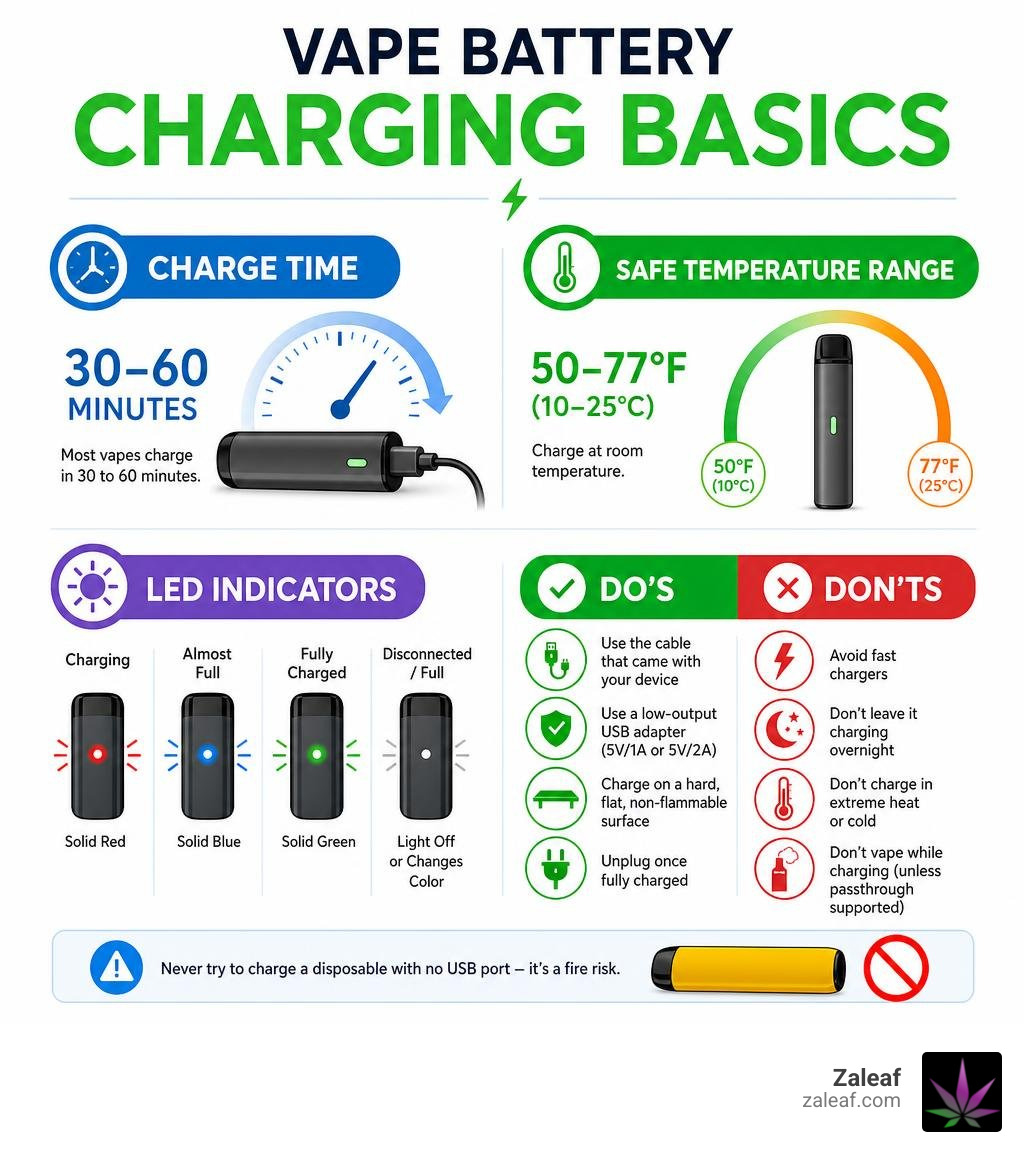
- Use the cable that came with your device or a quality replacement
- Charge on a hard, flat, non-flammable surface — never on a bed or couch
- Use a low-output USB adapter (5V/1A or 5V/2A) — avoid fast chargers
- Unplug once fully charged — don't leave it overnight
- Charge at room temperature — ideal range is 50–77°F (10–25°C)
- Never vape while it's charging unless your device explicitly supports passthrough
- Don't try to charge a disposable with no USB port — it's a fire risk
Most vapes charge in 30 to 60 minutes. A typical disposable battery (around 500 mAh) is fully charged in as little as 30–40 minutes. Box mods with larger batteries can take up to 100 minutes or more.
You can tell your vape is fully charged when the LED indicator turns solid green, changes color, or shuts off entirely. Devices with screens will show a full battery icon or 100%.
Bad charging habits — wrong charger, overnight charging, extreme temperatures — are the leading causes of shortened battery life and device failure. The fix is simple once you know what to watch for.
I'm Max Shemesh, owner and CEO of Zaleaf, and I've spent years working hands-on with cannabinoid vape products, helping thousands of customers get the most out of their devices — including understanding the basics of charging a vape safely and efficiently. In this guide, I'll walk you through everything you need to know to protect your battery, extend your device's life, and vape with confidence.
Charging a vape terms to remember:
The Essential Do’s and Don’ts of Charging a Vape

Vaping has evolved significantly over the years. Modern devices are more powerful and convenient than ever, featuring larger capacities, fast USB-C ports, and extended puff counts. However, because almost all vapes rely on high-energy-density lithium-ion batteries, how we handle their power cycles dictates how long they last—and how safe they are.
To help keep your device running smoothly, we have compiled a set of essential charging rules that every vaper should commit to memory. Following these practices not only keeps your hardware in peak condition but also prevents avoidable safety hazards.
- DO use the correct cable: Always use the charger that came in the box or a certified, reputable replacement.
- DO charge on a hard, flat surface: Wooden desks, kitchen counters, or glass tables are perfect. Avoid charging on beds, sofas, carpets, or piles of clothes, which trap heat.
- DO monitor the charging process: Keep an eye on your device and unplug it once the battery indicator shows it is fully charged.
- DO remove the pod or cartridge before charging: This simple trick prevents heat from oversaturating your coil, which can lead to messy leaks and a burnt taste later.
- DON'T charge your vape overnight: Leaving a device plugged in long after it hits 100% stresses the battery cells and degrades their long-term capacity.
- DON'T use fast-charging phone bricks: High-wattage wall adapters designed for modern smartphones can easily overwhelm a vape's simple charging circuit.
- DON'T expose the battery to extreme temperatures: Keep your device out of direct sunlight, freezing cars, and damp environments.
When you practice smart charging, you directly protect your investment. For a deeper dive into extending your device's overall lifespan, check out our guide on Optimizing Battery Life. For more safety fundamentals, you can also read How to Charge a Vape Safely (and What Not to Do).
Why Using the Correct Charger Matters When Charging a Vape
It is incredibly tempting to grab whatever USB-C cable and wall brick are lying nearest to your couch. However, doing so is one of the quickest ways to degrade your battery.
Vape batteries operate within strict voltage and amperage limits. While a high-end smartphone adapter might pump out 30W, 45W, or even more, most standard vape pens and pod systems are designed to draw a modest 5W to 10W (typically 5V/1A or 5V/2A).
When you connect a small vape battery to a high-output fast charger, the device’s internal circuitry has to work overtime to restrict the incoming current. If the device lacks advanced overvoltage protection, this mismatch can lead to excessive heat buildup, accelerated cell degradation, or complete hardware failure.
Using the manufacturer-provided cable ensures that the connection fits snugly and the power flow is stable. If you need to replace a lost or broken cord, seek out high-quality universal options specifically rated for lower power outputs. You can find excellent recommendations in our breakdown of Finding Your Perfect Vape Pen Charger Cable and Universal Options. To debunk common misconceptions about modern charging ports, check out Vape Battery Safety 101: Charging Tips & USB-C Myths.
The Dangers of Overnight Charging and Extreme Temperatures
We have all done it: we plug our vape in right before closing our eyes, letting it sit on the charger for seven or eight hours. While modern regulated mods contain internal chips designed to cut off the power once the battery is full, leaving a device plugged in indefinitely keeps the cells under constant electrical stress. Over time, this continuous "trickle charging" reduces the overall battery health.
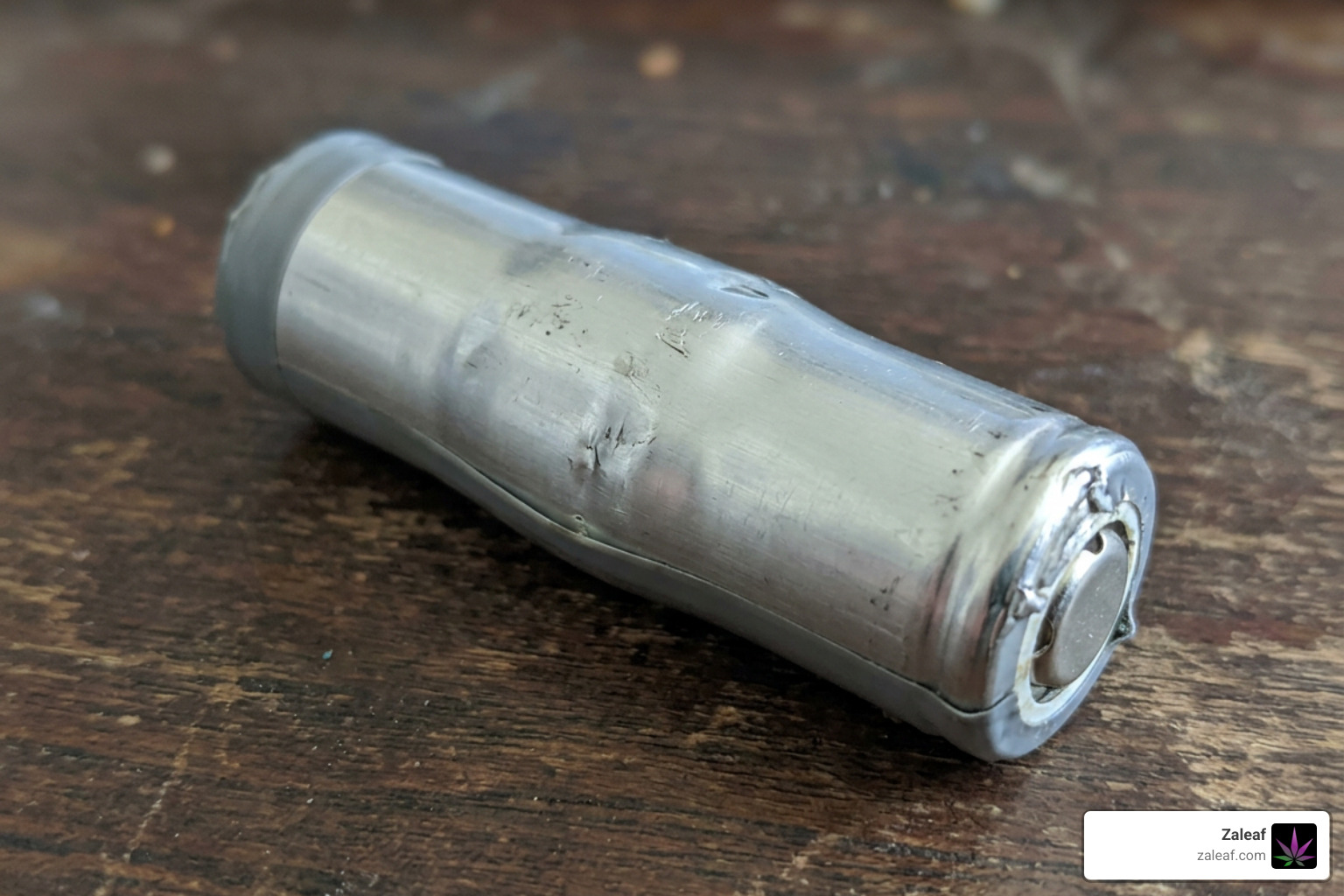
Even more dangerous is the risk of thermal runaway. This occurs when a battery cell generates heat faster than it can dissipate it, leading to a rapid, self-sustaining increase in temperature that can cause swelling, gas venting, or even fire.
Temperature plays a massive role in battery chemistry. Lithium-ion batteries lose significant capacity when exposed to temperatures outside their ideal charging range of 50–77°F (10–25°C).
- Extreme Heat: Charging your device in a hot car or under direct sunlight can raise internal temperatures past 80°C (176°F), which is the critical threshold where thermal runaway can begin. Every 9°C increase over 25°C effectively halves your battery's operational lifespan!
- Extreme Cold: Trying to charge your vape in freezing conditions is equally damaging. Cold weather drains battery charge by an extra 30% to 60% and can cause permanent lithium plating inside the cell, rendering it useless.
To learn more about keeping your hardware safe in all conditions, read through the Vape Battery Safety: The Complete UK Guide (2026) and explore our Vape Battery Lifespan Complete Guide.
How to Safely Recharge Disposable and Cartridge Vapes
The vaping landscape in June 2026 is heavily dominated by rechargeable disposable vapes and highly versatile cartridge systems. Because high-puff-count disposables need to remain compact and portable, manufacturers rely on smaller, rechargeable lithium-ion cells rather than massive, single-use batteries. This allows you to recharge the device multiple times until the e-liquid is completely depleted.
To help you understand the hardware differences, here is a quick comparison of typical specifications:
| Feature | Disposable Vape Battery | Rechargeable Cartridge/510 Battery |
|---|---|---|
| Typical Capacity | ~500 mAh | 350 mAh – 1100 mAh |
| Charging Port | USB-C or Micro-USB | USB-C, Micro-USB, or 510-threaded |
| Charging Speed | 0.8A – 1.0A | 0.5A – 1.0A |
| Average Charge Time | 30–40 minutes | 45–90 minutes |
| Lifespan | 4–5 charge cycles (until oil is gone) | 300–500 charge cycles |
Whether you are using a simple disposable or a premium cartridge battery, knowing the correct charging protocol is essential. For a thorough walkthrough of managing disposable power cycles, check out our guide, Juice It Up: The Ultimate Guide to Charging Disposable Vape Pens.
Step-by-Step Guide to Charging a Vape with a USB Port
If your vape has a built-in USB-C or Micro-USB port, recharging it is incredibly straightforward. Follow these steps to ensure a safe and efficient charge:
- Prepare the device: Remove the cartridge or pod from the battery. This prevents any heat generated during the charging process from thinning your concentrate and causing leaks.
- Inspect the port: Check the charging port for any pocket lint, dust, or residual oil. If you spot debris, gently clean it out using a non-metallic tool like a wooden toothpick.
- Connect the cable: Plug the micro-USB or USB-C cable firmly into your vape's port.
- Choose a low-output power source: Plug the other end of the cable into a computer USB port, a video game console, or a standard 5V/1A wall adapter. Avoid high-power smartphone bricks.
- Monitor the LED light: Look for the indicator light to turn on. It may pulse, glow red, or show a charging animation on a screen.
- Unplug promptly: Once the light changes to solid green, turns solid white, or shuts off completely, unplug the cable. Your vape is ready to go!
For those who are brand-new to cartridge setups, we highly recommend reading Unlock Your Vape: A Beginner's Guide to Cartridge Battery Use to ensure you are setting up your hardware correctly from day one.
Why You Should Never Attempt to Charge a Portless Disposable
Some older or lower-capacity disposable vapes do not feature a USB port. These devices are designed with a single-use battery that is carefully calibrated to die right around the time the pre-filled e-liquid runs out.
Under no circumstances should you ever attempt to manually recharge a portless disposable vape.
You may have seen "DIY" tutorials online showing how to dismantle a disposable vape, strip a USB cable down to bare wires, and touch them directly to the battery terminals. This is incredibly dangerous. Portless disposables completely lack the protective circuitry, chipsets, and sensors required to regulate electrical currents, prevent overcharging, or manage heat.
Attempting this makeshift charging method exposes you to immediate risks of short circuits, severe chemical burns, battery explosions, and electrical fires. Once a portless disposable dies, it is finished. Dispose of it responsibly at a local battery recycling center and upgrade to a safer, modern rechargeable system. To understand the technology that keeps your devices safe, explore our Demystifying THC Vape Batteries: A Comprehensive Guide.
The Hidden Damage of Vaping While Charging
Many modern vapes feature what is called "passthrough technology," which technically allows you to draw from the device while it is plugged in. While this is a highly convenient feature when you are caught with a dead battery, we strongly advise against making it a habit.
Vaping while charging puts immense stress on the battery and internal electronics. Here is what happens under the hood:
- Simultaneous Energy Flow: The battery is forced to receive electrical energy and deliver a high-amperage discharge simultaneously.
- Extreme Heat Buildup: Both charging and firing generate heat. Combining them causes internal temperatures to spike rapidly.
- Circuitry Stress: Disposable vapes and simple pod systems have basic chipsets that lack advanced thermal regulation. The constant temperature swings can weaken delicate solder joints and degrade battery chemistry.
- Minimal Charging Progress: Because the device prioritizes sending power to the heating coil, very little energy actually goes toward charging the battery while you inhale.
To protect your device from premature failure, it is always best to exercise a little patience. Unplug the vape, take your hits, and plug it back in to finish charging. For more details on this topic, read Can You Use a Vape While Charging? Is It Safe? and Why vaping while charging damages your disposable vape.
Troubleshooting a Vape That Won’t Charge
It is a frustrating scenario: you plug your vape in, but nothing happens. No lights flash, the screen remains dark, and the device stays completely dead. Before you panic and throw your device away, nine times out of ten, the issue is caused by a simple, easily fixable problem.
If you are experiencing issues, you can walk through our quick checklist to isolate the cause. For a complete look at resolving power issues, read our detailed guide on Battery Not Charging. For foundational troubleshooting tips, refer to How to Charge a Vape Battery Safely: The Complete Beginner's Guide.
Cleaning the Charging Port and Checking Connections
Because we carry our vapes in our pockets, purses, and backpacks, the charging ports act like little magnets for lint, dust, and debris. A tiny piece of pocket lint compressed at the bottom of a USB-C port can easily prevent the charging cable from making proper contact.
To fix this:
- Inspect the port: Shine a flashlight into the port to look for blockages.
- Clean gently: Use a thin, non-conductive tool like a wooden toothpick or a clean, dry cotton swab to gently sweep out any debris. Never use metal pins, paperclips, or needles, as they can permanently damage the gold connection pins or short out the electronics.
- Check the threads: If you are using a 510-threaded battery, clean the metal connection threads on both the battery and the charger using a cotton swab lightly dampened with isopropyl alcohol. Residual oil can block the electrical connection. Let it dry completely before reconnecting.
For more maintenance tips specific to 510 systems, see our guide on 510 Thread Battery Charging.
Identifying a Dead or Damaged Battery
If your port is clean and you have tried switching out your charging cable and power source, your battery may have reached the end of its natural lifespan or suffered physical damage.
Look out for these warning signs that indicate your battery needs to be replaced:
- Swelling or Bloating: If the body of your vape looks slightly warped, bulged, or if the seams are separating, stop using it immediately. Swelling is a clear sign of internal battery damage.
- Excessive Heat: If the device becomes hot to the touch (not just mildly warm) within a few minutes of being plugged in, unplug it immediately.
- Rapid Draining: If your vape takes a full charge but dies after only a few puffs, the lithium-ion cells can no longer hold a stable charge.
- Strange Smells: A sweet, metallic, or chemical odor coming from the battery compartment indicates a leaking cell.
If you observe any of these warning signs, handle the device with care, place it on a non-flammable surface outdoors, and take it to a local electronics recycling center. To better understand how long your equipment should typically last, read our guide on How Long Does a Vape Pen Battery Last.
Frequently Asked Questions About Vape Charging
How long does it typically take to charge a vape?
For most standard vape pens and rechargeable disposables with a typical battery capacity of around 500 mAh, a full charge takes approximately 30 to 40 minutes. Smaller pod systems can be ready in under an hour, whereas larger box mods with external batteries (like 18650 or 21700 cells) can take up to 100 minutes or more depending on the speed of your charger. For more details on charging times, see Vape Pen Charging.
How can you tell when a vape is fully charged?
Most vapes communicate their battery status using an LED light indicator. Here is how to read them:
- Pulsing or Red Light: The device is actively charging.
- Solid Green or White Light: The battery has reached 100% capacity.
- Light Shuts Off: Some devices turn off their LED completely once the charge cycle is done.
- Digital Screens: Advanced batteries will display a numerical percentage (100%) or a solid battery icon with no flashing segments.
To make sure you are reading your specific device correctly, check out A Quick Start Guide to Cartridge Battery Use.
What are the benefits of using rechargeable disposable vapes?
Rechargeable disposable vapes offer several advantages over older, non-rechargeable models:
- Cost Efficiency: They allow you to enjoy massive e-liquid capacities (up to 20,000 puffs) without needing a giant, heavy battery.
- Value for Money: You get to use every last drop of e-liquid in the chamber. With non-rechargeable models, the battery often dies while there is still usable e-liquid inside, forcing you to throw it away early.
- Reduced Waste: Because you can recharge the battery multiple times, you go through fewer individual devices, reducing the environmental footprint of discarded batteries.
To find the absolute best rechargeable options currently on the market, check out our review of Power Up Your Vaping: Top Rechargeable Vape Pens Reviewed.
Conclusion
Taking care of your vape battery is the single best way to ensure a consistent, safe, and satisfying vaping experience. By avoiding overnight charging, using the correct low-output cables, and keeping your charging ports clean, you can easily double the lifespan of your device.
At Zaleaf, we specialize in high-quality, 100% legal cannabis products designed to enhance your lifestyle. All of our products undergo rigorous third-party laboratory testing to ensure purity, potency, and safety. Plus, we offer fast shipping with completely discrete packaging right to your door—no medical card or ID required.
Ready to level up your vaping game and keep your devices running at their absolute best? Check out our ultimate guide, Charge On: Maximizing Your Vape Battery's Life and Speed, and explore our curated selection of premium hardware and cannabinoid blends today!